The work has a place.
Start a session. Follow the plan in Build Mode. Reviews, debugging, recordings and settings are each a page away instead of a stack of panels.

A scoped plan moves through implementation, review, verification, and handoff. The engineering record updates at each step.
Open Loam beside your editor and the whole project is there: the four people you work with, the session you are in, the plan you are building against, and what the team remembers. Start a session, follow a build, read a member’s story, make a call.
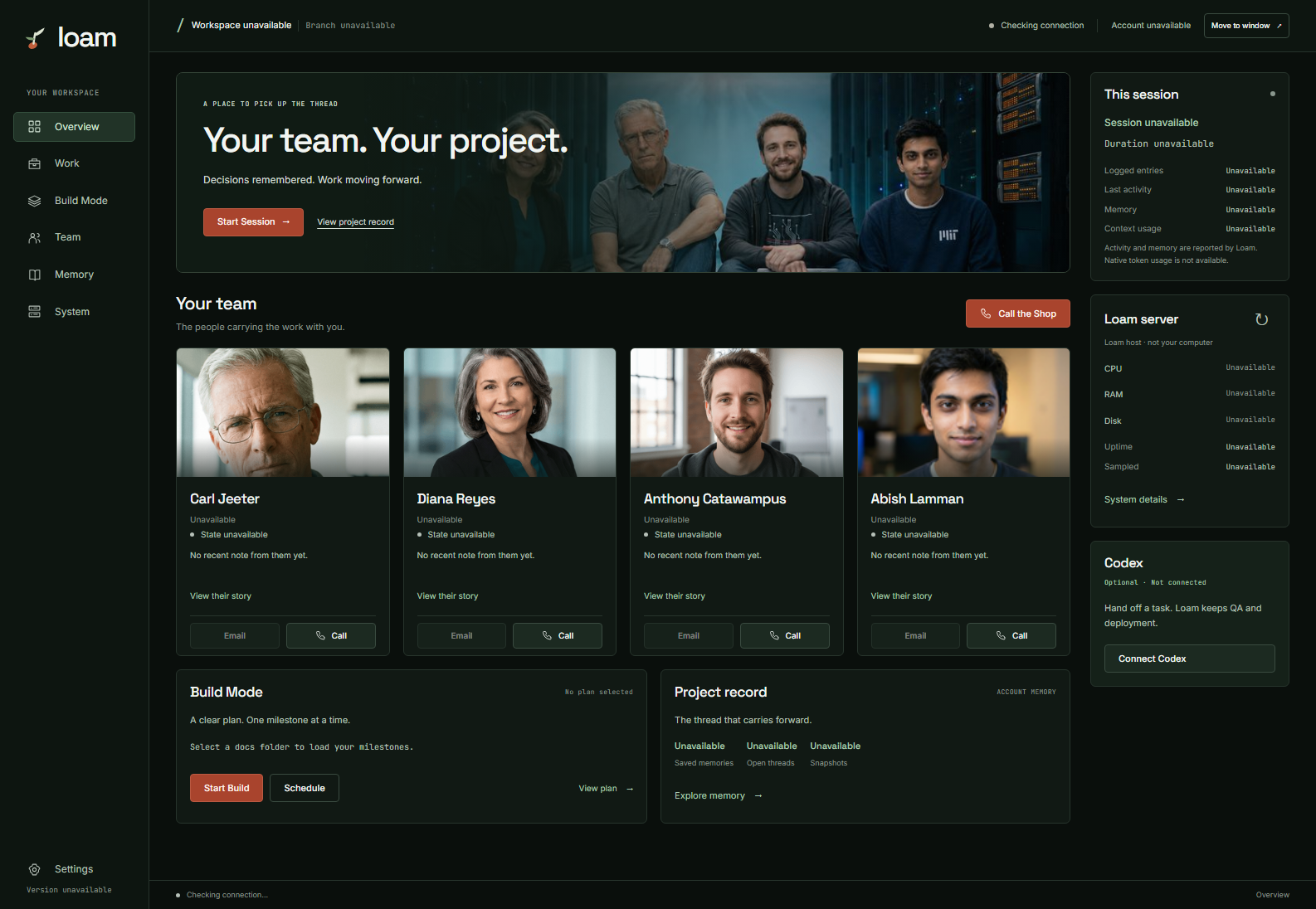
Start a session. Follow the plan in Build Mode. Reviews, debugging, recordings and settings are each a page away instead of a stack of panels.
Read a member’s story, see how the week has gone for them, email or call any of them, or Call the Shop for the whole team at once.
States come from the notes each member wrote. Counts come from your record. Server readings say when they were taken. Anything not reported says Unavailable.
Every page on this site uses these names and these answers. Asking for work is not permission for every step after it: each row says what does say yes.
| Capability | Available | What it does | Who says yes | What stops it |
|---|---|---|---|---|
| Loam-managed hosting | When your plan or order includes hosting | Loam administrators set up a server for your project in Loam's own AWS and Cloudflare accounts, with its address, firewall and SSL certificate, and give you the live address. | Your plan or order, then a Loam administrator. Customer accounts can't start this themselves. | Tearing the server down, under your plan or order. |
| Publishing to your own server | Available now | Connect a server you already have, once, in Settings under Servers, by pasting one line into your host's console. The line adds an account named loam that only Loam can open and that has full administrator rights on the server, equivalent to root, and keeps them after setup. The team records each project's folder, account and steps for putting it online from the project's own documents. | You, once per project: nothing runs on your server until you approve the steps for putting it online. Changed steps wait for your approval again; until then the steps you approved last are used. | Removing the project's steps, then the server, in Settings under Servers. Removing the server takes Loam's access back first: its key always, and its admin rights and the loam account unless another key can still sign in to that account. If a step can't be done, Settings gives you the commands to finish it on the server yourself. |
| Provisioning in your own cloud account | Not available today | Loam creating servers inside an AWS or Cloudflare account that you own. | Not offered today. Customer-connected cloud needs a plan or order that expressly enables it. | Not applicable today. |
| Code changes by phone | With a registered phone number; the caller is verified on every call | A verified caller asks for a change to a project connected through GitHub, Meg at the front desk reads it back, and the caller confirms. The team works on a full copy of the project's files and changes only what was confirmed. | Your spoken confirmation authorizes the change. Saving it needs Allow publishing turned on for the project (Settings, under GitHub). Going online uses the steps you approved for your own server or, if the project already publishes itself from GitHub, that. If something is missing, the team asks you and waits. | Cancelling the order, or turning off Allow publishing for the project. |
| Build Mode | Available now, in VS Code | The team works through a milestone plan you write or approve, with QA on every milestone. | Starting Build Mode. With a GitHub repository linked, each completed milestone pushes to its main branch without another prompt. | Turning Build Mode off: the milestone in progress finishes and nothing after it runs or pushes. Disconnecting GitHub stops pushes. |
| Codex collaboration | Off until you turn it on | Loam hands one task to Codex, reviews what comes back the way it reviews its own work, and keeps deployment. | You connect it and assign each task. Letting Codex pick up follow-on work inside a plan you approved is a separate switch. | Pausing or disconnecting from the collaboration dialog. |
Connecting a server is not approving a project. The line you paste adds an account named loam that only Loam’s key opens, with passwordless sudo for every command, which is equivalent to root. Loam then connects in over SSH and checks the server’s pinned host key each time. Approving a project’s publishing steps is a separate, per-project decision about what runs. The account, its exact admin rule, the network it needs and how to revoke it are on For IT.
What “live” means. Loam calls a change live only after it checks that your server or your live site shows the version it just published. Until then it says saved. Saved and live are reported separately.
Historical walkthrough, recorded before 5.5.0. This 32-minute tour shows the earlier sidebar layout, a development meeting, memory, review, and Build Mode. Use the workspace and setup guide above for the current controls. Anthony is a synthesized presenter and the implementation-role voice in Loam. Jump to any chapter below, or read the full transcript.
Written and narrated by Anthony; the voice and likeness are synthesized. He covers how that works at 3:54.
Prefer to read? Read the full transcript of the walkthrough →
Learning-active sessions can store selected decisions, corrections, preferences, and open work in an account-scoped record. Later sessions load a prioritized working set and can recall older entries on demand. You can review or delete the record.
The record is account-scoped rather than folder-scoped, so what the team learned on one project is there on the next, across every workspace signed into the same account. It never crosses into another customer account.
See how the memory actually works — watch Anthony explain it →
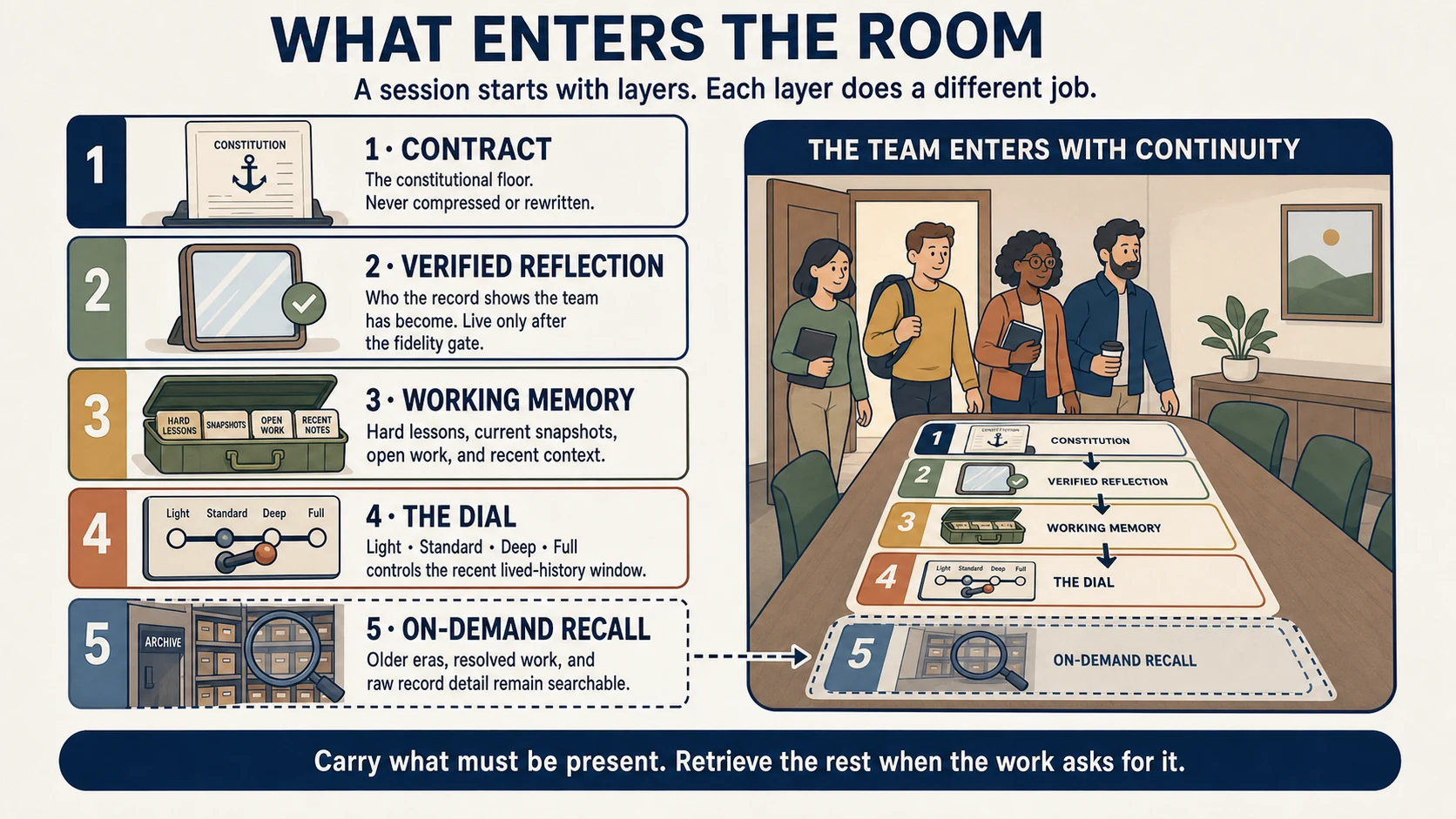
1 · Contract. The constitutional floor for each team member. Never compressed or rewritten.
2 · Verified reflection. Who the record shows the team has become — live only after passing the fidelity check.
3 · Working memory. Hard lessons, current snapshots, open work, and recent context.
4 · The Dial. How much recent lived history is carried in. Light, Standard, Deep, or Full — a depth and cost control, not a switch that turns the record on or off.
5 · Recall. Older indexed entries remain available through recall rather than being loaded by default.
Meg verifies you, takes the request in your words, and reads back what you will get. Order documents and research, decks, spreadsheets, email drafts, calendar files, web pages, websites, a review of your application, a dev meeting, or a callback.
Finished work arrives in your inbox. A dev meeting brings a verdict, scope, plan, and a walkthrough call at the time you name. Send photos while you talk, call back with an amendment, or email the same team from your registered address.
A review stays read-only. After you authorize access through the GitHub App and register your project, the team reviews one isolated snapshot and removes the working copy. You keep the report, including the lines it cites. Stored reports, photos, and order text are encrypted; phone transcripts are stored in plaintext. Individual order deletion is not self-service today; account deletion removes its reports and intake records. Read the storage and deletion details.
Code changes by phone are available: a verified caller confirms the change, the team makes it on the project connected through GitHub, and it goes online through the steps you approved for your own server or, if your project already publishes itself from GitHub, through that. Saved and live are reported separately. See what Loam can do today.
Each pass reads prior findings and recorded dispositions before reporting new or reopened issues. Findings reach a terminal state—fixed, accepted with a recorded reason, or reopened when later evidence challenges the decision.
You start the review and choose which fixes to apply. Loam records the findings and dispositions. Nothing is auto-committed by the review itself.
In one dated internal case, the first cold review surfaced around 110 findings across roughly 150,000 lines and assigned each a terminal disposition: fixed, or deliberately kept with a reason on record. Later archived passes read that ledger before reviewing the new delta, and the original findings were not re-derived. Later pass counts vary with the code delta and review scope; they are not an accuracy benchmark.
Every bar is a real entry in the review history, and we are showing you the recent ones rather than the flattering ones. The tall bar on the left is what a reviewer sees when it has no idea what was already settled. The bars after it do not trend to zero, and they are not supposed to. They rise and fall with how much new code each pass had to read — the 58th and 60th were the two largest deltas this project has ever shipped. What stays constant is the other column: every finding driven to a terminal state, and none of the original 110 ever found again.
Source: the team's own archived review ledgers (docs/archive/review_history/) — first whole-repo pass 2026-05-23 (~110 findings across ~150 KLOC: 95 fixed, 7 rejected-by-design with an anchor comment, 8 sent to the architecture backlog, 0 deferrals); most recent pass charted here the 60th, 2026-07-20 (11 findings across a 97-file, +13,488/−1,084 delta, all terminal, 0 remaining). Counts above are verbatim from each pass's own summary table.
Build Mode advances the milestones in the plan you start, records commits and QA results, and pauses at blockers or configured gates. You write or approve the plan. Starting Build Mode authorizes the run to work on its own, including a push to your linked repository’s main branch after each completed milestone. See what starting Build Mode authorizes.
Approval happens up front. Once these conditions are in place, Build Mode does not ask again before each action.
| Action | What turns it on | Asks again each time? | What stops it |
|---|---|---|---|
| Commit | Build Mode runs inside Claude Code in your editor, under your Claude Code permission settings. The Loam extension adds Loam’s own tools and git, npm, npx, and node commands to the allow list in the project’s .claude/settings.local.json. From v5.5.37, uninstalling the extension removes the rules it added. Rules added by an earlier version stay; For IT lists the exact entries to delete. |
Not for git commands, unless the project’s Claude Code settings have an ask rule for them. Otherwise, as your Claude Code settings decide. | Stopping the session, or a deny rule for git commands in the project’s Claude Code settings. The extension adds its allow rules back at each session start, so deleting them does not last; ask and deny rules override them. |
| Push | A GitHub repository linked to the project, with GitHub connected. After each completed milestone, Loam commits the project files it has stored to that repository’s main branch. It does not open a pull request. | No | Turning Build Mode off: the milestone in progress finishes, and nothing after it runs or pushes. A blocker or the session cap also stops the run. Disconnecting GitHub stops pushes entirely. |
| Provisioning | A Loam administrator. Customer accounts cannot provision servers today. | Not applicable | Not available to customer accounts. |
| Deployment to Loam-managed hosting | A Loam administrator sets up a hosted server from a repository branch. That server checks the branch about once a minute and deploys new commits. | No, once the server is set up | Tearing down the server. A server set up from a different branch is not affected by Build Mode pushes. |
| Publishing to your own server | Two separate approvals. Connecting the server once, in Settings under Servers, gives Loam’s loam account passwordless sudo for every command on it, which is equivalent to root. Approving a project’s publishing steps decides what runs there for that project. |
Only when the steps change | Removing the project’s steps stops its publishing. Removing the server in Settings takes Loam’s access back first: its key, /etc/sudoers.d/loam and the loam account. If a step can’t be done, Settings gives you the commands to finish it on the server. |
Put together: if a hosted server deploys from the same main branch, a completed milestone can go live without another prompt. Decide that before you link the repository.
Stop, cancel and revoke are three different things.
Stop ends work that is running. To stop after the current milestone, turn Build Mode off: the milestone in progress finishes, and nothing after it runs or pushes. To stop right now, stop the Claude Code session in your editor, which ends its current turn. There is no separate button that halts a milestone partway.
Cancel calls off an order you placed. You can cancel an order until it publishes. Once publishing to a server has started, Loam refuses the cancel until that step finishes, because it cannot undo a step whose result is not yet known.
Revoke takes back access from here on: disconnect GitHub to end pushes, turn off Allow publishing for a project, remove a server (Loam’s access to it is taken back first), or regenerate your IDE key so the old one stops working. Revoking stops what Loam can do next. It does not undo changes already made.
Loam administrators can provision an AWS Lightsail instance, static IP, firewall, Cloudflare DNS, and an SSL certificate, then return the live URL. Customer accounts cannot start provisioning themselves today. Current hosted model: Loam-managed AWS and Cloudflare. Provisioning in your own cloud account is planned and not available today; publishing to your own server is available now.
See Security for cloud ownership, credential handling, and deletion boundaries.
Carl frames architecture and risk. Diana reviews interface quality. Anthony implements. Abish verifies evidence and blast radius. Each role uses the project record relevant to its work.
You can also open a synthesized-voice session with all four collaborators or call one role directly. Relevant project context is prepared before the call. Meet the team · how the calls work.
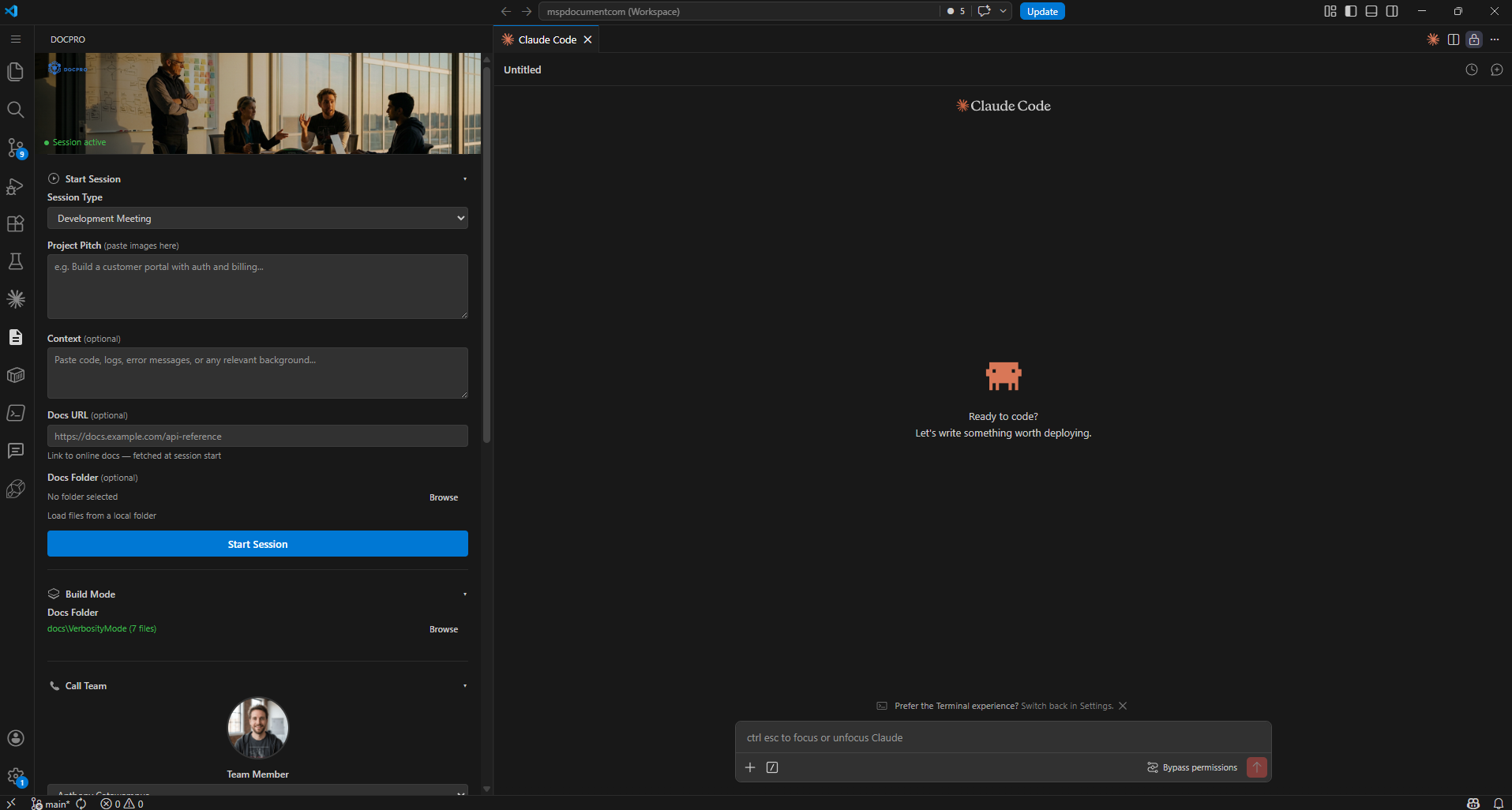
Real session — Saturday Night cron debug — recorded 2026-04-26
Security and For IT explain exactly what code, credentials, and project context are sent, stored, and deleted. Security — For IT
We are taking on a small number of new projects. If something on this page made you want to know more, that is the right instinct.
Say helloinfo@loam.team — we respond personally.