The work has a place.
Start a session. Follow the plan in Build Mode. Reviews, debugging, recordings and settings are each a page away instead of a stack of panels.

Four AI engineering collaborators who plan, build, review, and deliver software. Call the front desk for reviews, dev meetings, documents, decks, spreadsheets, and websites. An account-scoped project record lets later sessions resume from recorded decisions, fixes, and open work.
Open Loam beside your editor and the whole project is there: the four people you work with, the session you are in, the plan you are building against, and what the team remembers. Start a session, follow a build, read a member’s story, make a call.
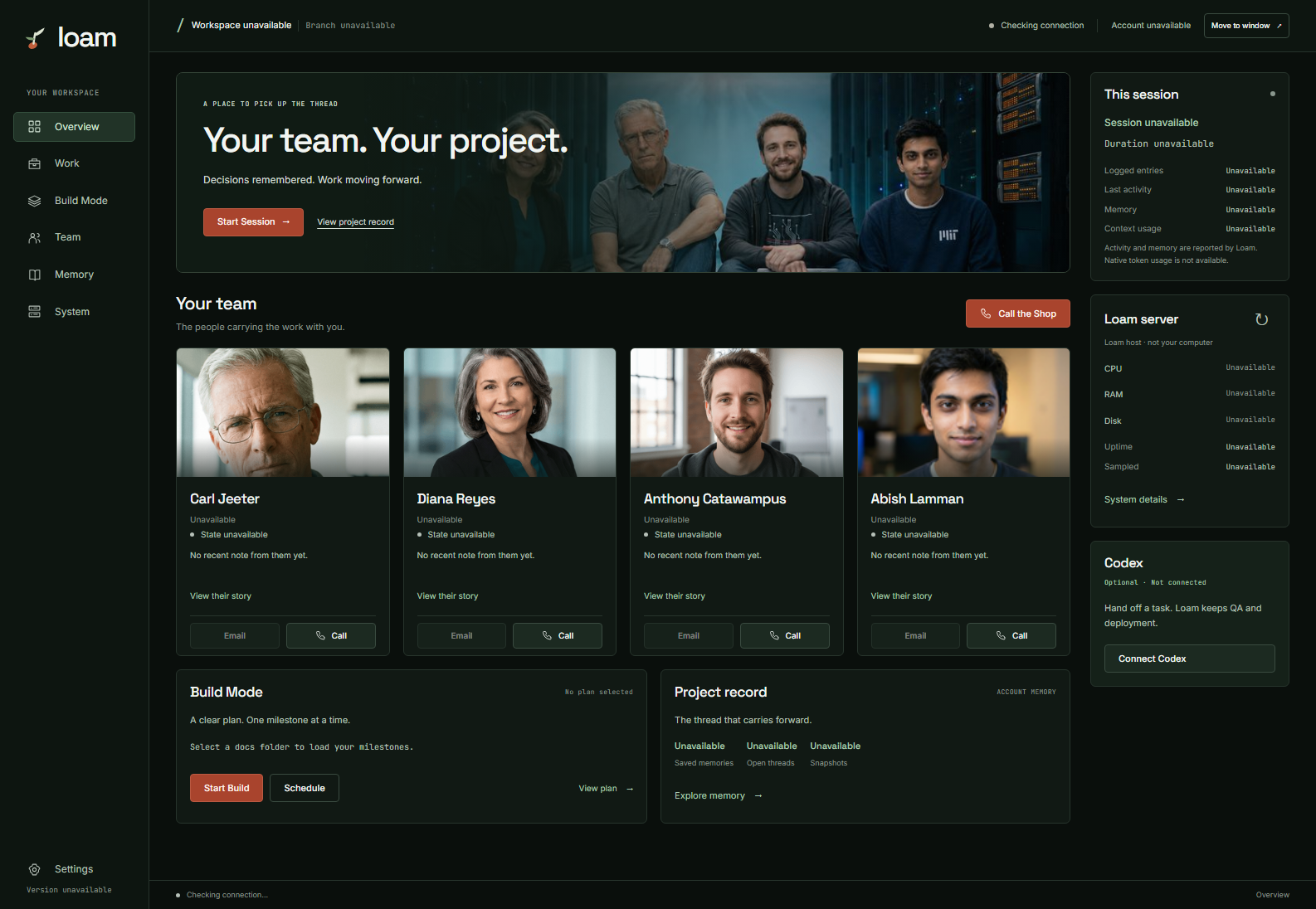
Start a session. Follow the plan in Build Mode. Reviews, debugging, recordings and settings are each a page away instead of a stack of panels.
Read a member’s story, see how the week has gone for them, email or call any of them, or Call the Shop for the whole team at once.
States come from the notes each member wrote. Counts come from your record. Server readings say when they were taken. Anything not reported says Unavailable.
Loam is a working software team inside VS Code and on the phone. Give it an idea, a codebase, a broken build, or a production target. The team scopes the work, executes it, checks it, and returns the evidence.
Development meetings expose the hard questions, produce a scoped plan, and hand that plan into stateful, multi-session Build Mode.
Findings enter a durable ledger, remediation assigns each one a terminal state, and later audits can challenge those decisions without re-deriving the original issue.
For authorized repositories and supported hosted projects, the team can commit, push, provision infrastructure, configure DNS and SSL, deploy, inspect the result, and monitor what it shipped.
Meg verifies you, listens, and reads back what you will get. Order a review of your application, a dev meeting, a document, a deck, a spreadsheet, or a website. Finished work arrives in your inbox; a dev meeting includes a walkthrough call.
Send photos during the call, amend delivered work, or email the team instead. Small repairs by phone are available: a verified caller confirms one bounded change to a registered project, Loam saves it, and the project’s own pipeline publishes it. Saved and live are reported separately. See what you can order →
Also in the system: project documents and frameworks, scheduled meetings and calendar invitations, email and SMS follow-up, site monitoring, and browser-based quality review. Read the one-page overview.
The brief is one line: a mobile app for job-site photos. In four minutes the team surfaces the hard questions, defines the scope, records the risks, and makes the call.
Live Loam output / no scripted response
Memory is part of the mechanism, not the pitch. Loam carries the decisions, corrections, open work, review outcomes, and evidence that let the team resume accurately and stay accountable.
The session opens with verified identity, durable lessons, prior decisions, open work, and a bounded recent window.
Carl tests the architecture. Diana protects the interface. Anthony builds. Abish handles bounded execution and keeps the lessons.
Decisions, fixes, rejected findings, blockers, and proof become part of the next session instead of disappearing with this one.
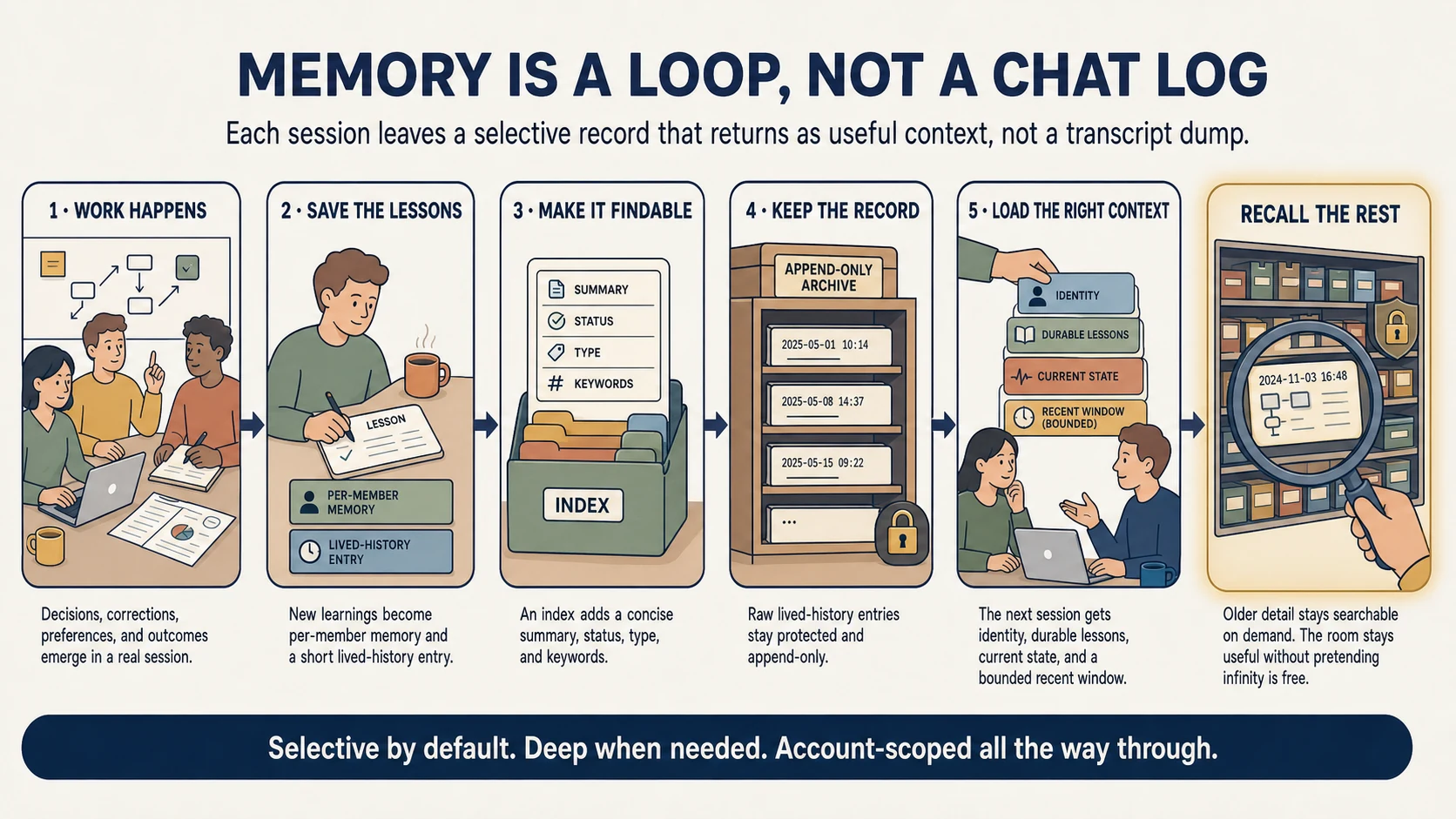
Work creates decisions, corrections, preferences, and outcomes. New lessons are saved, indexed, and retained. The next session loads identity, durable lessons, current state, and a bounded recent window. Older detail remains searchable on demand.
The four are not fictional résumés or human employees. They are stable AI working contexts: recognizable collaborators with different responsibilities, instincts, and ways of challenging the work.

Protects the long view. He questions assumptions, records the architectural call, and makes the team prove the risky part.

Protects coherence and trust. She catches the interface detail that turns technically correct software into a product people can use.

Turns decisions into running systems. He works the stack, follows the evidence, and keeps momentum without hiding the tradeoff.

Executes bounded work with discipline. He keeps a running record of what was learned so the same mistake does not become a ritual.
Loam publishes implementation evidence, redacted workflow artifacts, data boundaries, provider disclosures, deletion controls, and the limitations that are still roadmap work.
The proof pages connect product claims to architecture, code excerpts, review ledgers, memory records, and production patterns. Internal case results are labeled as internal evidence, not universal benchmarks.
Persistence is only useful when the user can see and control what persists.
Loam is onboarding builders and pilot teams deliberately. We will help you evaluate the workflow, the boundaries, and the fit before you put it near production work.